Stop Guessing, Start Tracking: Master Conversion Tracking to Boost Your Online Sales
Ever feel like you're doing everything right in your marketing—posting on social media, running ads, building a nice-looking website—but still not getting the results you want? That’s where conversion tracking comes in. It’s like turning on the lights in a dark room: suddenly, you can see what’s working, what’s not, and where your sales are coming from. Without it, you're just guessing.
What Is Conversion Tracking (And Why Should You Care)?
Conversion tracking is the process of monitoring and measuring the actions people take on your website after interacting with your marketing, like clicking a Facebook ad, signing up for your email list, or completing a purchase.
In simple terms, it helps you track what’s working in your marketing.
For eCommerce businesses, this is a game-changer. Imagine knowing exactly which ad led to a sale, or which product page turned a visitor into a buyer. That’s the power of conversion tracking. It connects the dots between your marketing efforts and real results, so you can stop wasting money on what doesn’t work and double down on what does.
Whether you're running Facebook or Instagram ads, promoting on TikTok, or sending out email campaigns, conversion tracking helps you:
See which traffic sources drive the most sales
Understand your return on ad spend (ROAS)
Optimize your website or product pages for better results
Create better-targeted campaigns using real customer data
Without it, you’re not just flying blind—you’re potentially losing money every single day.
How Conversion Tracking Works (Without the Tech Headache)
You don’t need to be a tech wizard to understand how conversion tracking works. At its core, it’s about using tiny tools that quietly follow what users do on your site, so you can gather insights and make smarter decisions.
Here are the main components you should know:
Pixels: The Silent Observers
A pixel is a small piece of code you add to your website. Platforms like Facebook, Instagram, or TikTok provide it.
Think of it like a digital tracking device—it quietly watches what people do after they click your ad and visit your site.
For example:
Did they view a product?
Add something to the cart?
Complete a purchase?
When you have a pixel installed (like the Meta Pixel), you can track all of this and more, plus optimize your ads to show to people most likely to convert.
Events: The Key Actions That Matter
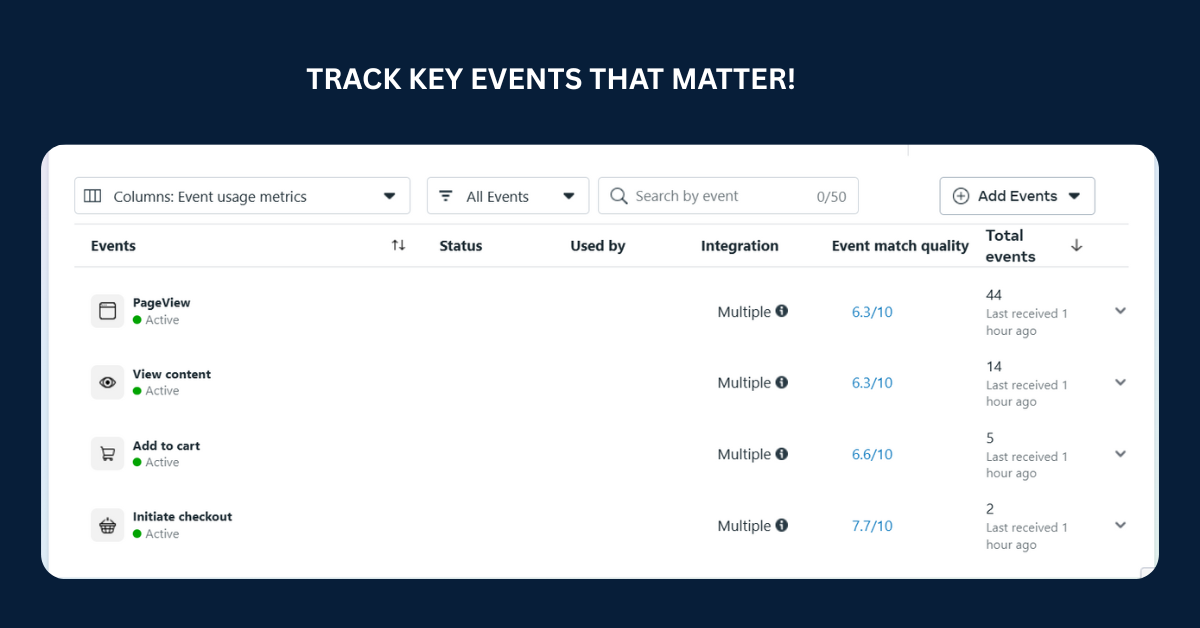
Events are the specific actions you want to track on your site. These could include:
Page views
Add to cart
Checkout started
Purchase completed
Email sign-up
You define these actions in your pixel or analytics tool so the system knows which moments are important.
In eCommerce, purchase and add to cart events are gold—they tell you what’s driving sales and where shoppers might be dropping off.
🔹 UTM Tags: The Link Trackers
Ever seen a long URL with “utm_source” or “utm_campaign” in it? That’s a UTM tag—a little snippet of text you add to links so tools like Google Analytics can tell you where your traffic is coming from.
These tags help you answer questions like:
Did this sale come from my Instagram ad or my email newsletter?
Which campaign drove the most visits to this product page?
Bottom Line?
Pixels, events, and UTM tags work together to give you a clear picture of your customer’s journey—from ad click to checkout. Once you understand this flow, you can tweak, optimize, and scale what’s working and fix what’s not.
How to Set Up Basic Conversion Tracking (Without Getting Overwhelmed)
Now that you know what conversion tracking is and how it works, let’s break down how to set it up for your eCommerce business, starting with Meta Ads and Shopify. Good news: you don’t need to be a developer, and most of it is plug-and-play!
🛒 If You’re Using Shopify
Shopify makes conversion tracking easy because it’s already built to work with major ad platforms. Here's how to get started:
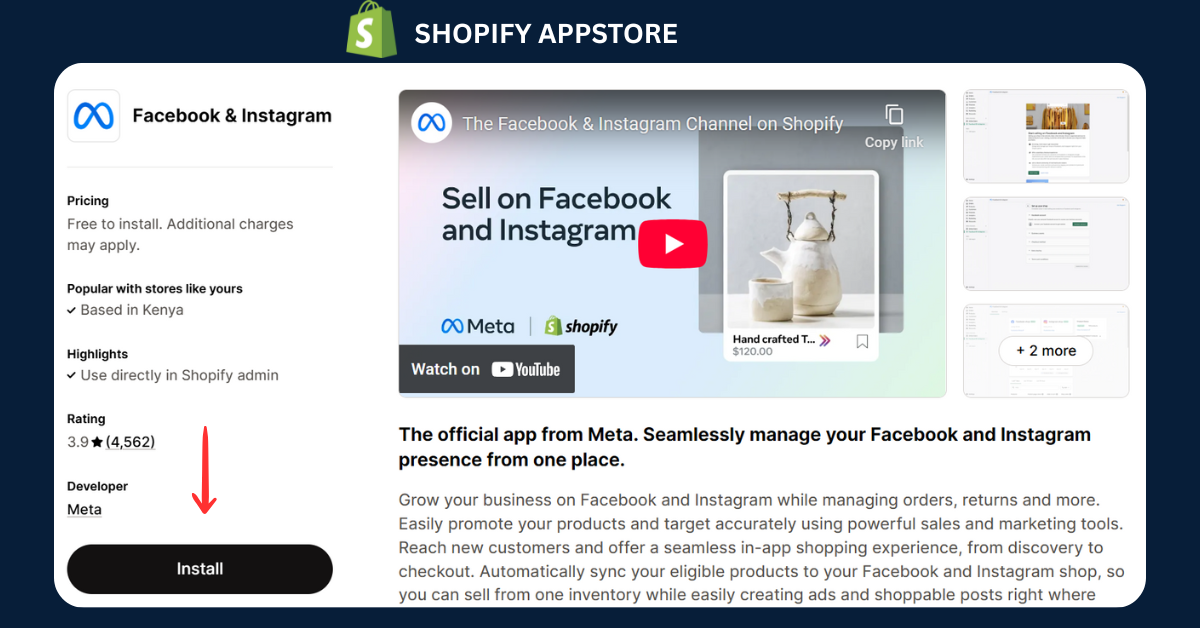
Step 1: Add the Facebook & Instagram app (by Meta)
Go to your Shopify dashboard
Search for Facebook & Instagram in the Shopify App Store
Install the app and connect it to your Meta Business Manager
Step 2: Connect your ad account + Facebook Pixel
Inside the app, log in to your Meta account
Select the Facebook Page, Ad Account, and Pixel you want to use
Shopify will automatically install the Meta Pixel on your store
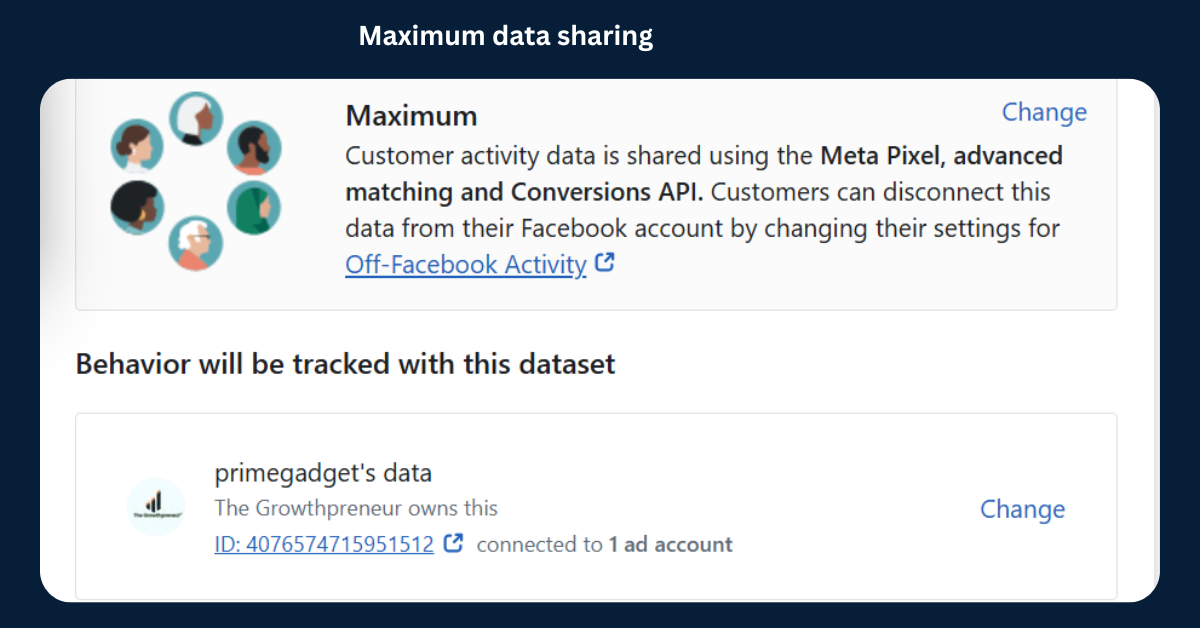
Step 3: Turn on Data Sharing
Shopify gives you a Data Sharing Settings option
Set it to Maximum so it uses both browser and server-side tracking (Meta CAPI)
This helps you track conversions more accurately, even with iOS privacy changes
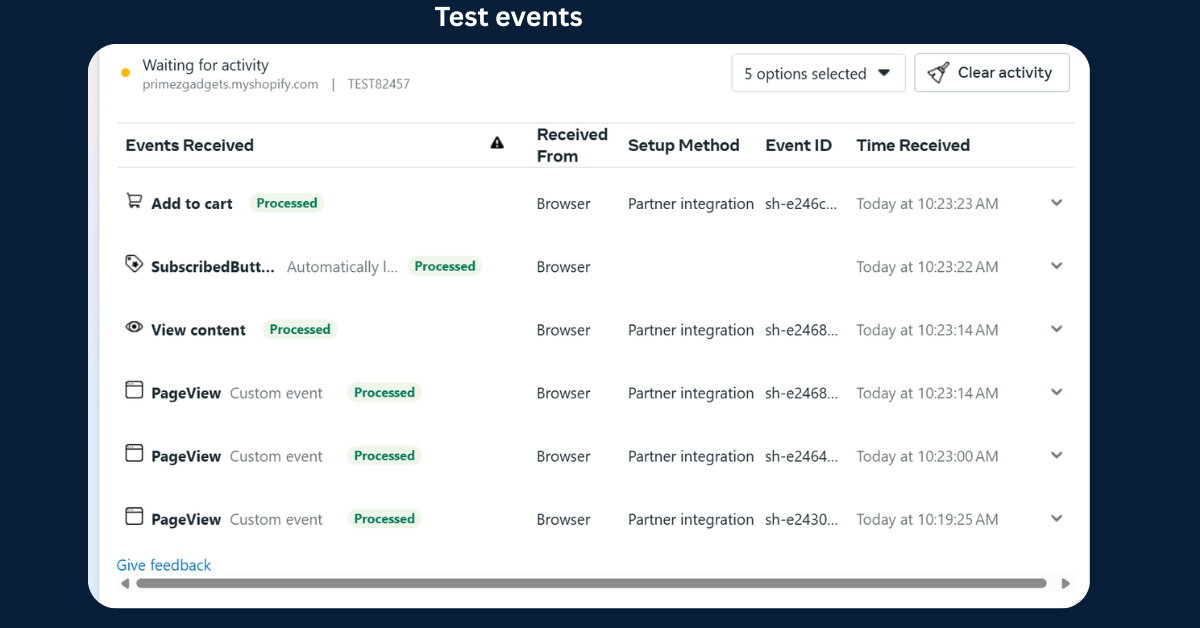
Step 4: Verify your Pixel is working
Go to Meta Events Manager → Find your Pixel → Check that events like “ViewContent” and “Purchase” are firing
You can also use the Meta Pixel Helper Chrome extension to test your store
Done! Now you’re tracking key actions like product views, add-to-cart, and purchases from Meta Ads.
📲 If You’re Running Meta Ads (Facebook/Instagram)
Already running ads or planning to? You’ll want to optimize them for conversions. Here's how:
Step 1: Create Conversion Events in Events Manager
Visits meta events manager
Make sure your Pixel is installed and active
Set up standard events (like “Purchase” or “AddToCart”)—Shopify usually handles this automatically
Step 2: Set Your Campaign Objective
In Meta Ads Manager, choose “Sales” as your campaign objective
Under ad set level, choose “Website” as the conversion location
Select the event you want to optimize for (e.g., Purchase)
Step 3: Let the Algorithm Work
As your Pixel collects data, Meta will start showing your ads to people who are more likely to convert
The more data it gets, the better it performs (this is why tracking is essential)
Pro Tip: Track Outside Ads Too
If you're promoting on email, TikTok, or influencers, use UTM tags on your links to track where traffic and sales come from. Shopify reports + Google Analytics will help you measure those results.
Don’t Let Data Go to Waste: Mistakes to Avoid & How to Use Conversion Tracking to Grow Faster
Setting up conversion tracking is one thing, but knowing what to do with the data (and what NOT to do) is where the magic happens. Here are the most common mistakes beginners make—and how to turn tracking into smarter marketing decisions.
❌ Common Conversion Tracking Mistakes to Avoid
1. Not testing your pixel after installing it
Just because you added the Meta Pixel doesn’t mean it’s firing correctly. Use the Meta Pixel Helper Chrome extension to confirm events like "PageView", "AddToCart", or "Purchase" are triggering.
2. Tracking the wrong events Don’t just track page views—focus on meaningful actions like purchases, form submissions, email signups, and cart adds. These are what drive business results.
3. Using the same tracking for every campaign Different campaigns have different goals. A traffic campaign needs different tracking than a sales campaign. Match your objective with the correct conversion event.
Here are a few examples:
Traffic Campaign → Track PageView to measure visits to your product or landing pages.
Engagement Campaign → Track ViewContent or AddToCart to see if people are interacting with your products.
Lead Generation Campaign → Track Lead (e.g., newsletter signup, quiz submission).
Sales (Conversions) Campaign → Track Purchase to optimize for actual completed checkouts.
App Promotion Campaign → Track AppInstall or CompleteRegistration events.
Using the right event for each campaign goal helps Meta optimize delivery and improves your results over time.
4. Not using UTM parameters UTM parameters are small bits of text added to the end of your URLs
They help tools like Google Analytics or Meta Ads Manager track where your visitors are coming from and what campaigns are driving results.
If you’re running influencer promos, email campaigns, or even TikTok videos without UTM tags, you’re missing out on knowing which traffic sources convert. With UTM tracking, you can compare how traffic from Instagram Stories performs versus Facebook Ads or email campaigns, so you can double down on what works best.
5. Ignoring post-purchase behavior Tracking ends when the customer buys? Wrong. Post-purchase tracking helps you understand customer retention and maximize revenue.
Here's how to track key actions:
Repeat Purchases: Use the 'Purchase' event with customer IDs or email addresses to identify returning buyers in platforms like Shopify, Klaviyo, or Meta Ads.
Upsells: Track 'InitiateCheckout' or 'AddToCart' events tied to upsell offers after the main purchase (e.g., post-purchase upsell pages or popups). Use custom events or tags for specific upsell funnels.
Email Engagement: Email tools like Klaviyo or Mailchimp automatically track opens, clicks, and conversions. Link these actions with UTM tags and tracked landing pages to see which emails lead to actual sales.
By tracking these behaviors, you can create more effective loyalty campaigns, segment audiences based on engagement, and boost customer lifetime value (CLV).
✅ How to Use Conversion Tracking to Optimize Your Ads & Store
1. Identify high-converting traffic sources Look at which channels (e.g., Instagram, Facebook, email) are driving the most sales. Double down on those and cut back on underperforming ones.
2. Spot your top-performing products Track which product pages lead to the most conversions. Promote them more in your ads, emails, and homepage. This is especially useful in Shopify analytics.
3. Leverage data to optimize your conversions If people are clicking but not buying, it’s a signal to improve your landing page or product description. If people add to cart but don’t purchase, try testing different checkout experiences or offering trust badges, free shipping, or urgency.
4. Build retargeting audiences
Retargeting is a digital marketing strategy where you show ads to people who’ve already interacted with your store, like viewing a product or adding to cart. It helps bring warm leads back and turn them into buyers. Use data from your pixel to retarget visitors who:
Viewed a product but didn’t purchase
Added to cart but abandoned it
Bought once but haven’t returned
Retargeting based on these actions is one of the highest-ROI tactics in Meta advertising.
5. Let the algorithm learn When you track the right events and give Meta clean data, it learns who your best buyers are. During the learning phase, Meta’s algorithm tests different audience segments and placements to understand who’s most likely to convert. The more quality data it receives—like purchases or add-to-carts—the smarter it becomes at optimizing delivery. This leads to better Return on Ad Spend (ROAS) and lower cost per result. Avoid making too many changes early on, like switching events or restarting campaigns, as it resets the learning and slows performance growth.
Final Thoughts
Conversion tracking isn’t just a fancy tech feature—it’s your marketing GPS. Set it up right, avoid common mistakes, and use the insights to build campaigns and stores that grow your bottom line.
🔁 Quick Recap
Conversion tracking is essential if you want to grow your eCommerce or online business the smart way. You’ve learned:
✅ What conversion tracking is and why it matters ✅ How it works using pixels, events, and UTM tags ✅ How to set it up with Meta Ads and Shopify ✅ Common mistakes to avoid ✅ How to use the data to improve your ads and store
Now it’s your move: stop guessing and start tracking what truly drives your growth.
🚀 Ready to Take Action?
If you're serious about turning your store into a data-driven sales machine, don’t just read about conversion tracking—put it into play.
👉 Need help setting up conversion tracking or optimizing your ad strategy? Let’s chat! Book a free 15-minute consultation, and I’ll help you spot quick wins in your setup.
🎁 Bonus: Free Downloadable Resource (Optional Lead Magnet)
Get My Free "Conversion Tracking Checklist for Beginners" Download this easy-to-follow PDF that walks you through:
At Growthpreneur, we specialize in Facebook and Instagram marketing and advertising services tailored specifically for small and medium e-commerce and dropshipping businesses. Our services are designed to help you reach your target audience effectively and maximize your online presence. We understand the unique challenges faced by e-commerce businesses, and we leverage our expertise to create compelling ad campaigns that drive engagement and conversions. Whether you need help with strategic planning, content creation, or performance analysis, our dedicated team is here to support your growth every step of the way.
At Growthpreneur, we believe that successful campaigns start with a deep understanding of your business and target market. Our team conducts thorough market research to identify trends and customer preferences. We then craft tailored marketing strategies that resonate with your audience. Our approach includes A/B testing, real-time performance monitoring, and data-driven adjustments to ensure your campaigns perform optimally. We focus on maximizing your return on investment (ROI) by continuously analyzing results and refining our tactics. Partner with us to experience a calculated approach that prioritizes your business objectives and drives measurable results.
Absolutely! Growthpreneur offers comprehensive social media management services that go beyond just advertising. We help you create a cohesive brand presence on platforms like Facebook and Instagram. Our team manages content creation, scheduling, and engagement with your audience. We focus on building authentic connections and fostering community around your brand. By analyzing audience interactions and feedback, we tailor our strategies to enhance your brand’s online reputation and visibility. With our support, you can dedicate more time to running your business while we handle your social media needs effectively.